
Your resume is no longer just a document — it’s your personal marketing tool. In 2026, most companies use Applicant Tracking Systems (ATS) and AI-powered recruiting software to filter candidates before a human recruiter or headhunter even sees the application.
This means that having a visually attractive resume is not enough anymore. Your CV must also be optimized for both:
- Human recruiters (headhunters)
- ATS software systems
If your resume isn’t ATS-friendly, it may never reach the hiring manager, even if you’re highly qualified.
In this guide, you’ll learn how to optimize your resume to pass ATS filters, attract recruiters, and improve your chances of landing interviews for remote and international jobs.
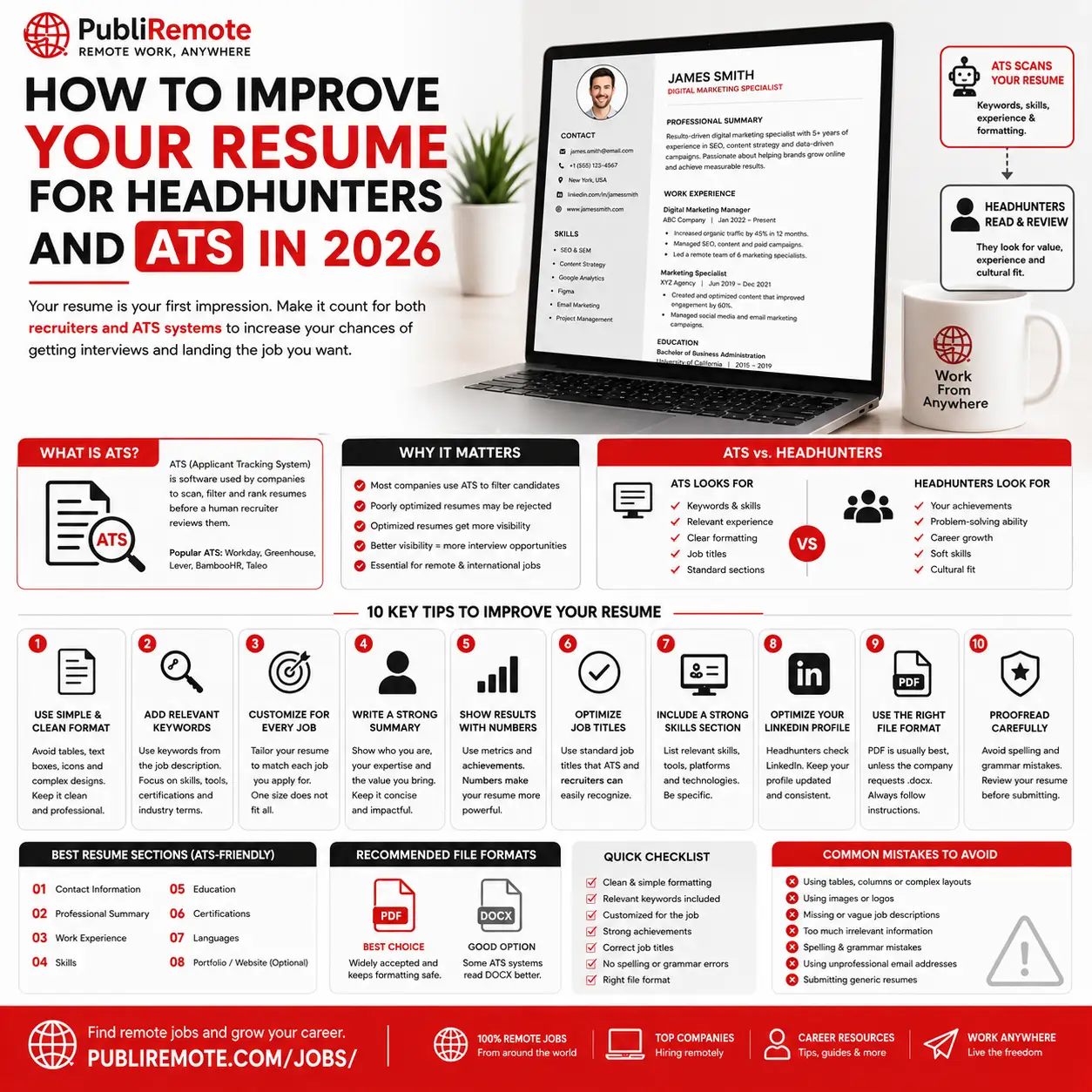
In today’s competitive job market, having a good resume is no longer enough. Most companies now use Applicant Tracking Systems (ATS) and AI-powered recruiting tools to filter resumes before a recruiter or headhunter even sees them.
This means your resume must be optimized not only for people, but also for software.
A modern ATS-friendly resume can help you:
- Pass automatic screening systems
- Increase recruiter visibility
- Improve interview opportunities
- Stand out in remote and international job applications
Whether you’re applying for remote jobs, freelance opportunities, or corporate positions, understanding how ATS systems work can dramatically improve your chances of getting hired.
What Is an ATS Resume?
ATS stands for Applicant Tracking System.
Companies use ATS software to:
- Scan resumes
- Filter candidates
- Search keywords
- Rank applicants automatically
These systems analyze your resume before a recruiter reviews it manually.
Popular ATS systems include:
- Workday
- Greenhouse
- Lever
- BambooHR
- Taleo
Why ATS Optimization Matters
Many resumes are rejected automatically because:
- They use poor formatting
- Missing keywords
- Complex designs
- Images or graphics
- Unclear job titles
An ATS-friendly resume increases your visibility and improves your chances of passing the first screening stage.
1. Use Simple & Clean Resume Formatting
ATS systems struggle with complicated layouts.
Avoid:
- Tables
- Text boxes
- Complex graphics
- Icons
- Multiple columns
- Fancy fonts
Best Practice:
Use a clean, professional structure with:
- Clear headings
- Standard fonts
- Simple formatting
- Easy-to-read sections
Recommended Fonts:
- Arial
- Calibri
- Helvetica
- Times New Roman
2. Add Relevant Keywords
Keywords are one of the most important ATS ranking factors.
Recruiters and ATS systems search for:
- Skills
- Tools
- Certifications
- Job titles
- Industry-specific terms
Example:
If the job description includes:
- “Project Management”
- “Remote Collaboration”
- “Figma”
- “SEO”
your resume should naturally include those terms if they match your experience.
3. Customize Your Resume for Every Job
One generic resume is no longer enough.
Tailoring your resume for each application dramatically improves ATS performance.
Focus On:
- Matching keywords
- Relevant experience
- Industry terminology
- Specific job titles
This helps ATS systems identify you as a strong candidate.
4. Create a Strong Professional Summary
Your resume summary should quickly explain:
- Who you are
- Your expertise
- Key achievements
- Your value to employers
Example:
“Creative digital marketing specialist with 4+ years of experience in remote content strategy, SEO optimization, and social media management for global brands.”
Keep it concise and results-focused.
5. Use ATS-Friendly File Formats
Most recruiters prefer:
- DOCX
However, some ATS systems work better with DOCX files.
Safe Option:
- Use PDF unless the company requests otherwise.
Always check the job application instructions carefully.
6. Optimize Job Titles
Use recognizable and searchable job titles.
Instead of:
“Digital Wizard”
Use:
“Digital Marketing Specialist”
ATS systems rely heavily on standard industry terminology.
7. Highlight Measurable Results
Recruiters and headhunters love quantifiable achievements.
Better Example:
“Increased website traffic by 45% through SEO optimization and content strategy.”
Numbers make your resume more credible and impactful.
8. Add a Skills Section
ATS systems scan skill sections carefully.
Include:
- Technical skills
- Software tools
- Languages
- Certifications
- AI tools
- Remote collaboration platforms
Example Skills:
- Figma
- Photoshop
- SEO
- Python
- Slack
- Notion
- Google Analytics
- ChatGPT workflows
9. Optimize Your LinkedIn Profile Too
Headhunters often compare your resume with your LinkedIn profile.
Make sure:
- Job titles match
- Dates are consistent
- Skills align
- Profile photo looks professional
A strong LinkedIn profile can significantly improve recruiter visibility.
10. Avoid Common Resume Mistakes
Common ATS Problems:
- Too many graphics
- Missing keywords
- Spelling mistakes
- Unprofessional email addresses
- Large file sizes
- Generic summaries
Even small formatting errors can hurt ATS performance.
Best Resume Sections for ATS
A modern ATS-friendly resume should include:
- Contact Information
- Professional Summary
- Work Experience
- Skills
- Education
- Certifications
- Portfolio or Website (optional)
Best Tools to Optimize Your Resume
Helpful Resume Platforms:
These tools help create professional and ATS-friendly resumes faster.
Why Headhunters Care About Resume Optimization
Headhunters review hundreds of resumes every week.
A strong resume helps them quickly identify:
- Relevant skills
- Experience
- Professionalism
- Industry fit
- Career growth potential
The easier your resume is to read and scan, the better your chances of getting contacted.
Final Thoughts
In 2026, resume optimization is no longer optional. Your resume must work for both:
- ATS systems
- Human recruiters
A modern resume should be:
- Clear
- Keyword-optimized
- Results-focused
- Professional
- ATS-friendly
Small improvements can dramatically increase your interview opportunities, especially for remote and international positions.
For more career tips, remote work guides, and job opportunities, visit PubliRemote Blog.
